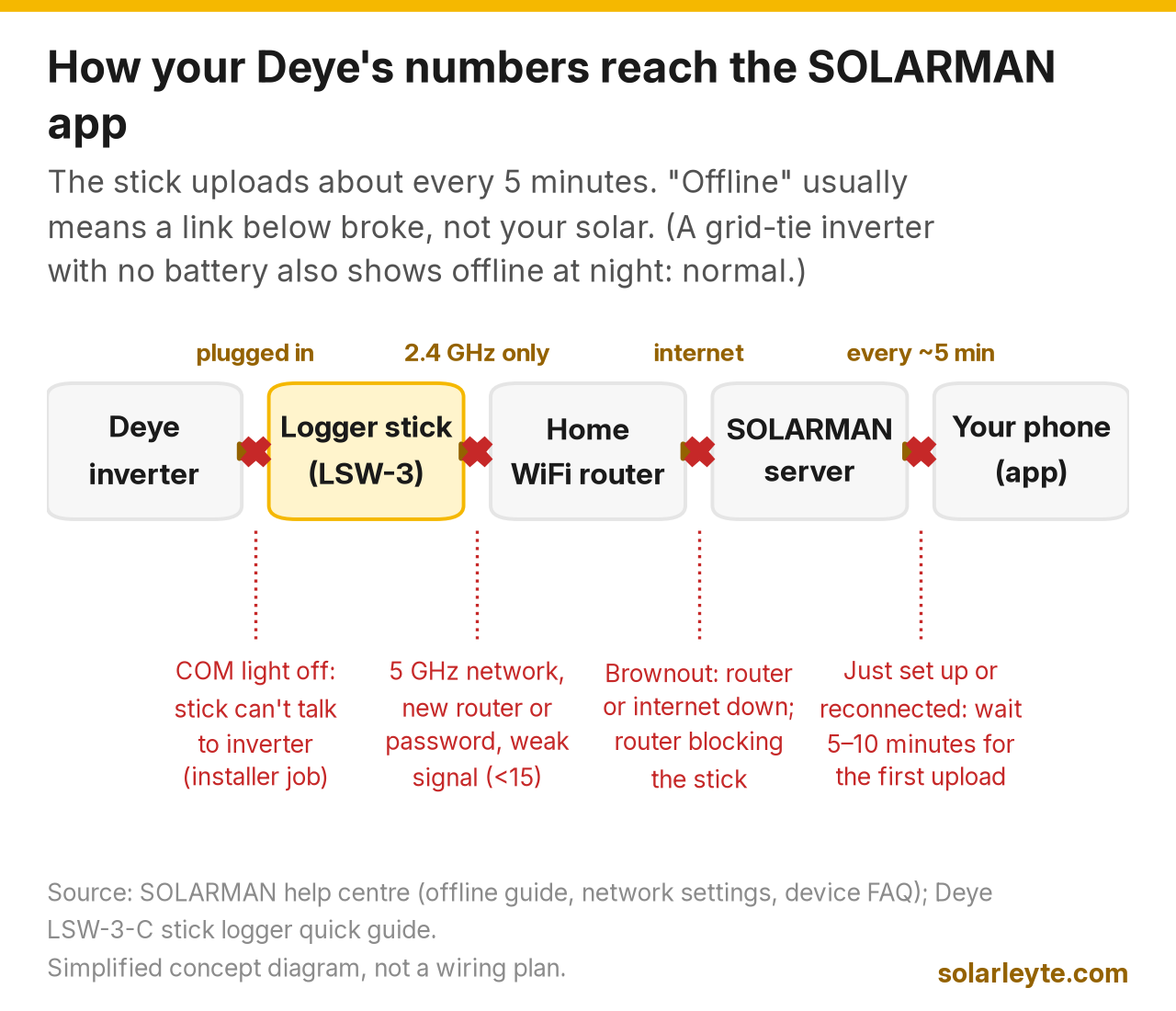
SOLARMAN Smart is the free phone app that shows what your Deye inverter is doing: how much your panels are making, what the house is using, what you're buying from or sending to the grid, and your battery level. It doesn't talk to the inverter directly. A small logger stick plugged into the inverter sends the data over your home WiFi to SOLARMAN's servers, about every 5 minutes (SOLARMAN help centre). So when the app says "offline", it's usually the WiFi link that broke, not your solar. The most common causes are a 5 GHz network (the stick only works on 2.4 GHz), a new router or WiFi password, and a brownout that took your internet down.
Sa madaling salita:
- The app is a window, not a remote control. Your inverter keeps working even when the app shows offline.
- After any change of router, WiFi name or password, you have to re-do the "Networking" step in the app.
- Grid-tie (no battery) inverter showing offline at night? That's normal. No sun, no data.
- Don't change inverter settings from the app unless your installer tells you which ones.
Last checked: 22 October 2026. We read SOLARMAN's help centre, the Deye-branded LSW-3-C stick logger quick guide, Deye's SUN-3.6–8K-SG05LP1 manual, and the SOLARMAN Smart and Deye Cloud app store listings that day. App screens change with updates, so menu names may differ slightly on your phone.
Which app: SOLARMAN Smart, SOLARMAN Business or Deye Cloud?
Deye's WiFi monitoring runs through a SOLARMAN logger stick (Deye publishes the LSW-3-C stick's guide on its own website). Deye says the WiFi plug is optional, not standard (Deye SG05LP1 manual), so check that your installer actually included one. The stick's own quick guide names two apps: SOLARMAN Smart for end users and SOLARMAN Business for installers (Deye LSW-3-C quick guide). Deye also runs its own app, Deye Cloud.
App | Who it's for | Publisher (Google Play) | Google Play, 22 Oct 2026 | Privacy label (developer's own) |
|---|---|---|---|---|
SOLARMAN Smart | Homeowners | IGEN Tech Co., Ltd. | 1M+ downloads, updated 13 Oct 2026 | May share device IDs with third parties; collects location, personal info and more; encrypted in transit |
SOLARMAN Business | Installers and dealers | IGEN Tech Co., Ltd. | Named in the stick's quick guide as the business app | Not checked |
Deye Cloud | Homeowners and installers | Shanghai CuiJi Technology Co., Ltd. (support email at deye.com.cn) | 1M+ downloads, updated 16 Oct 2026 | No data shared or collected, per the developer; encrypted in transit |
Sources: Google Play listings for SOLARMAN Smart and Deye Cloud; Deye LSW-3-C quick guide.
Which one should you use? The one your installer registered your system ("plant") on. A logger can only sit under one plant at a time (SOLARMAN FAQ). If you install a second app and add the same stick, you'll get a "device already added" message. In January 2024 Deye moved Deye Cloud's data out of SOLARMAN's data centre into its own (Deye announcement), so the two are separate platforms now, with separate accounts.
How to set up SOLARMAN Smart (first time)
This follows SOLARMAN's own network settings guide and the LSW-3-C quick guide. Stand near the inverter with your phone.
- Register in SOLARMAN Smart and create your plant ("Add Now"), filling in the basic details.
- Add the logger by typing its serial number (SN) or scanning the code. The SN is on the stick and its box.
- Connect your phone to your home 2.4 GHz WiFi first, then go to the device list, find the logger and tap Networking. Confirm the WiFi name, type the password and tap Start.
- Join the stick's own network. In your phone's WiFi list, connect to "AP_" followed by the logger's serial number. The password, if asked, is printed on the stick. Then go back to the app.
- Wait. The app configures the stick automatically. The logger will still say offline for a while; data usually shows within 10 minutes.
If it fails, SOLARMAN's checklist is: WiFi on, router working, no allow/block list on the router, phone closer to the stick, try another WiFi, and no special characters (such as , ; ' = " `) in the WiFi name or password.
What the numbers mean
The app shows the same four flows your inverter's screen does, but with history. Deye's manual itself says the LCD graphs are rough and to "check on the monitoring system" for more accurate generation figures (SG05LP1 manual).
What you see | What it means | Why it matters |
|---|---|---|
Production (PV) | Power or energy from your panels | Low on a sunny noon? Check for shade, dirt, or a fault code |
Consumption (Load) | What your house is using | Spot the aircon, ref and water pump habits |
Grid (buy / sell) | Power you're importing from BILECO or LEYECO, or exporting | Imports are what you pay for. Exports only earn credit under net metering |
Battery (SOC, charge / discharge) | Battery % and whether it's filling or draining | Tells you how many brownout hours you have left |
One catch with battery %: SOLARMAN says the SOC figure comes straight from the inverter, shown the way the inverter maker's protocol says (SOLARMAN FAQ). If it's stuck or jumps around, it's an inverter or battery question for your installer, not an app bug.
Worked example: reading one day in pesos
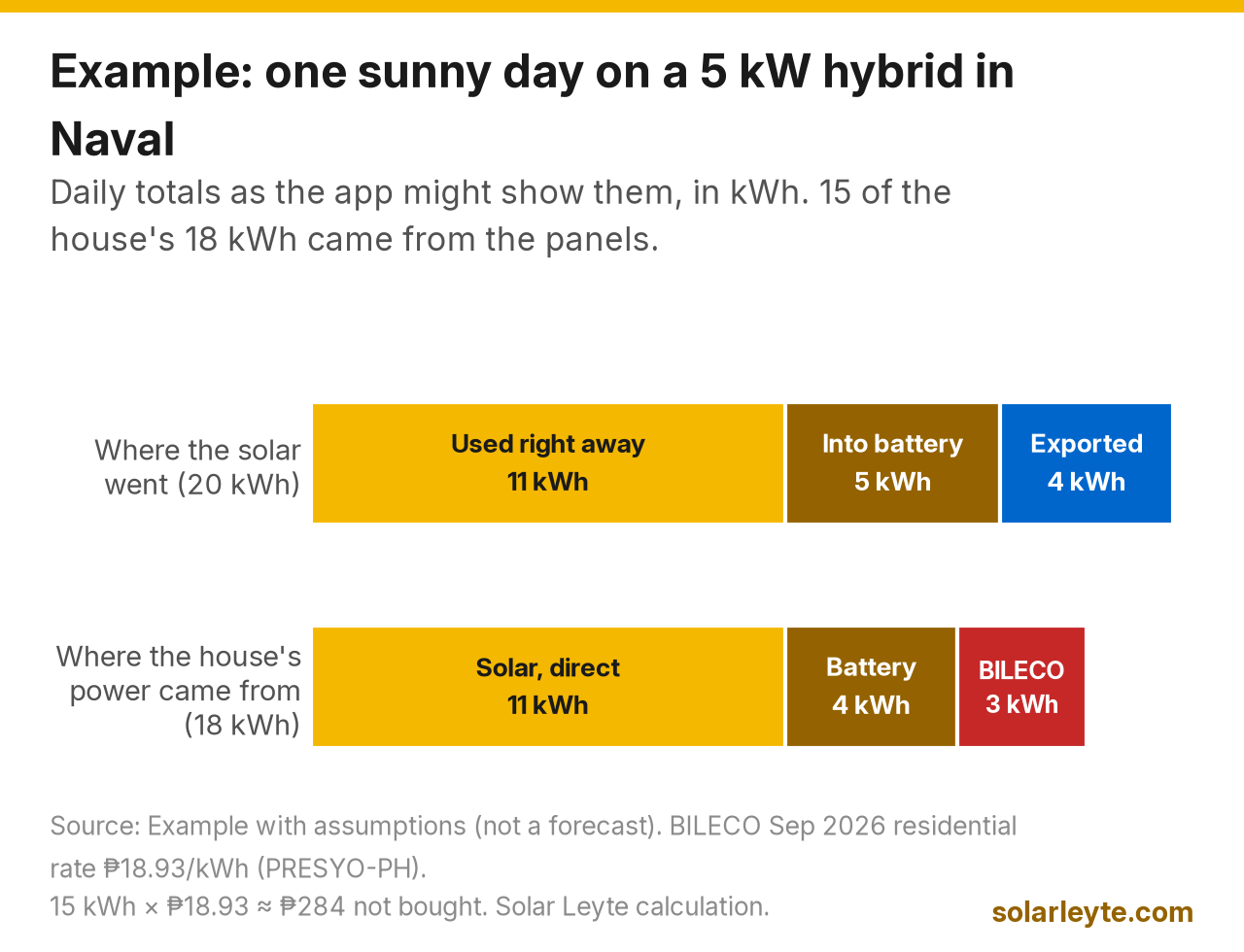
Example with assumptions, not a forecast: a 5 kW hybrid system with a battery in Naval, on a sunny day. The app's daily totals show Production 20 kWh, Consumption 18 kWh, bought from the grid 3 kWh, sold to the grid 4 kWh, battery charged 5 kWh and discharged 4 kWh. (Charge is higher than discharge because batteries lose a little energy.)
Where the solar went | kWh | Where the house's power came from | kWh |
|---|---|---|---|
Used in the house right away | 11 | Solar, directly | 11 |
Into the battery | 5 | Battery (charged from solar) | 4 |
Exported to the grid | 4 | Bought from BILECO | 3 |
Total production | 20 | Total consumption | 18 |
So 15 of the house's 18 kWh came from your own panels, directly or through the battery. At BILECO's September 2026 residential rate of ₱18.93 per kWh (PRESYO-PH; see our BILECO rate tracker), that's 15 × ₱18.93 = about ₱284 you didn't buy from BILECO that day. The 4 kWh exported only counts for something if you're on net metering, and even then it's credited at less than the retail rate (BILECO net metering guide). That's why "bought from grid" and "sold to grid" are the two numbers worth watching most.
Why the app says "offline", and what to do
First, a quick test: is the inverter screen on and showing power? If yes, your solar is fine and only the data link is down. If the inverter itself is off or showing a fault, see our Deye error codes guide instead.
Situation | Likely cause | What you can safely do |
|---|---|---|
Just set up, says offline | Data hasn't uploaded yet | Wait 5–10 minutes. The stick uploads every 5 minutes |
Grid-tie (no battery), offline every night | Inverter isn't generating, so it goes quiet | Normal. SOLARMAN says a device that isn't generating shows offline |
New router, new WiFi name or password | The stick still has the old details | Re-do Networking in the app (steps above) |
Router set to 5 GHz only, or a combined name that steers to 5 GHz | Stick supports 2.4 GHz only | Turn on 2.4 GHz on the router, or give it a separate name |
Brownout | Router or the internet provider's equipment lost power | Wait for the internet to return; ask your installer if the router can go on the backup circuit |
Weak signal | Router too far, thick concrete walls | Signal below 15 is "weak" per SOLARMAN; move the router closer |
Still offline after all that | Router blocking the stick, or a faulty stick | Try a phone hotspot for 30 minutes (below) |
Sources: SOLARMAN help centre (offline guide, why a device shows offline, network settings, device FAQ).
SOLARMAN's own WiFi rules are worth knowing before you buy a new router: 2.4 GHz only, WiFi name no longer than 30 characters, plain letters and numbers in the name and password, and DHCP switched on (most home routers have it on already).
Brownouts: the stick needs internet, not just power
This one catches a lot of hybrid owners in Leyte and Biliran. During a BILECO or LEYECO brownout, your hybrid inverter switches your backed-up circuits to battery, but the app can still go offline if your router isn't on backup or your internet is down. The stick sends data through your router, and if the router (or the fibre box) is on a circuit that isn't backed up, or your internet provider's own equipment down the road has lost power, there's no path to the server. Nothing is wrong with the solar. When the internet comes back, the app shows live data again. If you want to watch your battery % during long outages, like the Visayas grid alerts we had this year, ask your installer whether the router and modem can be wired to the inverter's backup (load) side.
Reading the three lights on the stick
The LSW-3-C stick has three green lights. Check them at least 2 minutes after power-up (Deye LSW-3-C quick guide).
Light | Off | Slow flash (1 s on, 1 s off) | Steady on |
|---|---|---|---|
NET (router/server) | Can't reach the router | Connected to router, not yet to server | Connected to the server: good |
COM (inverter) | Can't talk to the inverter | Talking to the inverter | Connected to the inverter: good |
READY (stick itself) | Not running properly | Running normally: good | — |
A healthy stick shows NET steady, COM steady and READY slowly flashing. NET slow-flashing for a long time means your router works but something is blocking the stick from SOLARMAN's server.
The safe owner fixes, in order
- Re-do Networking in the app with your current 2.4 GHz WiFi. This fixes most cases. If the app keeps failing, SOLARMAN also has a browser method: join the stick's AP network and open 10.10.100.254.
- Hotspot test. SOLARMAN suggests connecting the stick to a phone hotspot for 30 minutes. If it comes online, your router is blocking it. If it still can't reach the server, "the logger may be broken".
- Reboot the stick: hold its Reset button for 5 seconds. Holding for 10 seconds restores factory settings, and you'll have to redo the networking.
- Don't pull the stick out while the inverter is on. The quick guide says to remove the logger only after power off, and not to twist the stick's body when fitting it. If it needs reseating, let your installer do it.
If the stick connects to WiFi but COM stays off, SOLARMAN's checklist starts with the inverter's communication address (it should be 1) and baud rate. Those are inverter settings, so that's an installer job.
Can I change inverter settings from the app?
Sometimes. SOLARMAN Smart has a Remote Control option, but SOLARMAN says it needs authorisation from the inverter maker, and many owners won't see it (SOLARMAN FAQ). Even if you have it, leave battery and grid settings to your installer. Wrong values can drain a battery too deep or break your co-op's export rules. Our Deye vs Solis vs SRNE comparison covers what these inverters can do and how warranty claims work.
Sharing access: don't give your installer, or a relative abroad, your password. SOLARMAN lets you grant authorisation to view your plant instead, which you can take back later.
FAQ
Is the SOLARMAN Smart app free? Yes, it's free on Google Play and the App Store. The WiFi stick is the part you pay for, and Deye lists it as optional for its SG05LP1 hybrids.
Why is my Solarman data 5 minutes late? The stick uploads about every 5 minutes, by design. For second-by-second readings, look at the inverter's own screen.
My grid-tie inverter shows offline every night. Is it broken? No. A grid-tie inverter without a battery stops when there's no sun, and SOLARMAN shows a device that isn't generating as offline. It should come back in the morning.
I changed my PLDT or Globe router. What do I do? Re-do the Networking step in SOLARMAN Smart with the new WiFi name and password, on 2.4 GHz. Data usually returns within 10 minutes.
Should I switch to Deye Cloud? Only if your installer sets it up that way. Both work with Deye inverters, but they're separate platforms with separate accounts, and a logger sits under one plant at a time.
Solar Leyte is run by MACC Systems & Energy Solutions Inc., a solar installer in Naval, Biliran.
Planning solar with monitoring you can actually read? Get a free quote from MACC
Tell us what you want to see on your phone (battery %, grid imports, brownout hours) and send a photo of your latest BILECO or LEYECO bill. We'll show you the sizing and savings math, with no obligation.
- Call/Text: 0955 723 5093
- Email: official@macc-inc.com or benjie@macc-inc.com
- Website: www.macc-inc.com
- Request a quote online: solarleyte.com/quote
- Office: Brgy. Talustusan, Naval, Biliran 6543
Sources (all checked 22 October 2026)
- SOLARMAN help centre: Troubleshooting guide for data logger offline issues (2.4 GHz only; signal below 15 unstable; WiFi name up to 30 characters; letters and numbers; DHCP; 30-minute hotspot test; uploads every 5 minutes, wait 5–10 minutes); Network settings (setup steps, AP_ network, data within 10 minutes, special characters, "the logger may be broken"); Changed WiFi password (browser method, 10.10.100.254); Why equipment shows offline; Device FAQ (signal weak/medium/strong, SOC from inverter, communication address 1, remote control permissions, one logger per plant, authorisation)
- Deye, LSW-3-C Stick Logger Quick Guide (June 2025): NET/COM/READY lights, check after 2 minutes, Reset 5 s reboot / 10 s factory reset, remove logger after power off, SOLARMAN Smart for end users and SOLARMAN Business for business, setup steps
- Deye, SUN-3.6–8K-SG05LP1-EU user manual (19 March 2026): WiFi plug optional; LCD curves rough, check the monitoring system; monitoring by GPRS/WiFi/Bluetooth/4G/LAN (optional)
- Deye, Deye Cloud data migration announcement (15 January 2024)
- App listings: Google Play, SOLARMAN Smart (IGEN Tech Co., Ltd.; 1M+ downloads; updated 13 Oct 2026; data safety label) and Deye Cloud (1M+ downloads; updated 16 Oct 2026; data safety label); App Store, SOLARMAN Smart (IGEN Tech Co., Ltd.; authorisation feature)
- Rate: ICSC, PRESYO-PH national table (BILECO residential, September 2026, ₱18.93/kWh, latest available on 22 October 2026)
- The one-day reading in "Worked example" is an example with stated assumptions; the peso figure is a Solar Leyte calculation.